—
Introduction: From Weather Vials to Smart Sensors
Remember the days when meteorologists relied on glass vials of rainwater and handwritten wind charts? Today, a sleek automatic meteorological monitoring station—often called an automated weather station—can be set up in minutes and deliver real‑time, hyper‑accurate data right to your smartphone or cloud dashboard. Whether you’re a farmer, a small business owner, a hobbyist, or a climate researcher, these stations are unlocking insights that were once the exclusive domain of national weather services.
In this post, we’ll dive deep into what makes an automatic meteorological monitoring station a game‑changer, break down its core components, walk through a step‑by‑step installation guide, and show you how to turn raw data into actionable decisions. By the end, you’ll know exactly how to set up, maintain, and benefit from your very own weather data hub—no meteorology degree required.
—
1. Why Automatic Meteorological Monitoring Stations Matter
1.1 Precision at a Fraction of the Cost
Traditional weather stations, especially those operated by government agencies, can cost thousands of dollars and require professional installation. In contrast, a consumer‑grade automated station can be purchased for a few hundred dollars, and many models come with plug‑and‑play firmware. The trade‑off? You gain high‑resolution data—temperature, humidity, wind speed, atmospheric pressure, and even UV index—at the exact spot where it matters most.
1.2 Real‑Time Data for Immediate Action
The “automatic” in the name isn’t just marketing buzz. These stations continuously sample the environment and transmit data via Wi‑Fi, cellular, or LoRa to a cloud service or local gateway. This means you can receive alerts for sudden temperature drops, high winds, or precipitation spikes within seconds, allowing you to protect crops, schedule irrigation, or adjust HVAC loads instantly.
1.3 Empowering Smart Agriculture and Energy Management
Farmers use automated weather stations to fine‑tune irrigation schedules, predict frost events, and manage crop yields. Energy companies deploy them to forecast renewable generation (solar irradiance, wind speed) and optimize grid loads. Even hobbyists can feed the data into home automation systems—turning on the fan when humidity rises above 70% or opening blinds when the UV index hits a threshold.
—
2. Key Components and Sensors: What Makes a Station Smart
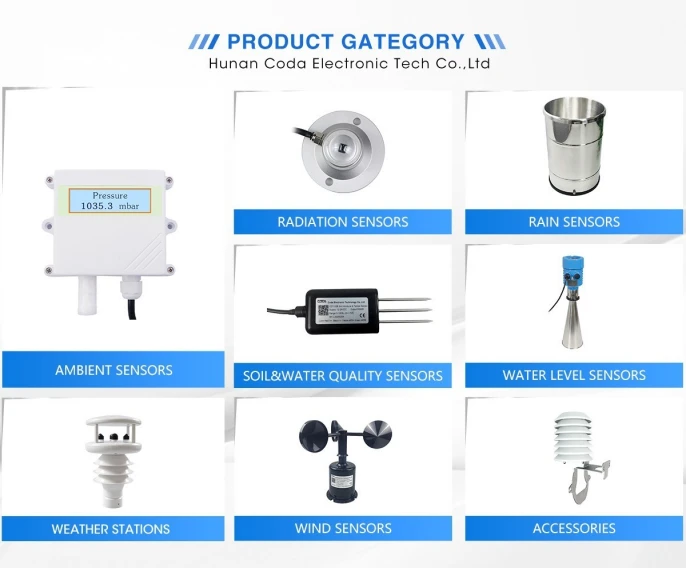
| Component | Function | Typical Sensor |
|———–|———-|—————-|
| Anemometer | Measures wind speed | Cup or ultrasonic |
| Wind Vane | Determines wind direction | Magnetic or optical |
| Barometer | Detects atmospheric pressure | MEMS |
| Thermometer | Records air temperature | RTD or thermistor |
| Hygrometer | Gauges humidity | Capacitive or resistive |
| Rain Gauge | Measures precipitation | Tipping bucket or optical |
| UV Sensor | Measures solar ultraviolet | Photodiode |
| Solar Panel (Optional) | Provides power in off‑grid setups | PV cell |
| Data Logger & Processor | Stores & processes data | ARM Cortex‑M or ESP32 |
| Communication Module | Sends data to cloud | Wi‑Fi, cellular, LoRa |
| Enclosure | Protects electronics | Weather‑sealed housing |
Actionable Tip
When choosing a station, prioritize sensor accuracy and calibration support. Look for models that allow manual calibration against a reference station—this can improve data quality by up to 30%.
—
3. Setting Up Your Automated Weather Station: A Step‑by‑Step Guide
3.1 Planning the Site
1. Avoid Obstructions: Place the station at least 2 m above ground and 10 m away from buildings or trees that could block wind or cast shadows.
2. Choose a Stable Surface: For ground‑mounted units, a concrete pad or a sturdy tripod works best. For rooftop installations, ensure the structure can support the weight.
3. Consider Power: If you’re in a remote area, evaluate solar panel options. Most stations now come with a 12 V battery backup for cloudy days.
3.2 Physical Installation
1. Mount the Tower: If your system includes a wind tower, secure it firmly using the provided brackets and lock nuts. Tighten to manufacturer specifications.
2. Attach Sensors: Align the wind vane horizontally and the anemometer vertically. Ensure the rain gauge is level to avoid false readings.
3. Seal the Enclosure: Use weather‑proof silicone to seal any gaps. This prevents moisture ingress and protects the electronics.
3.3 Wiring and Power
1. Connect Power: Attach the main power supply—whether it’s a 12 V battery pack or a solar panel with charge controller.
2. Wire Sensors: Use shielded cables to reduce electromagnetic interference. Follow the wiring diagram in your manual.
3. Check Connections: Inspect all connectors for tightness. A loose connection can lead to intermittent data loss.
3.4 Software Configuration
1. Install Firmware: Many stations ship with pre‑loaded firmware, but you can often flash newer versions for bug fixes or feature updates.
2. Configure Network: Set up Wi‑Fi or cellular credentials. For LoRa, program the gateway address and frequency.
3. Calibrate Sensors: Use the calibration routine (if available). For temperature/humidity, compare against a known reference station.
4. Set Data Frequency: Decide how often you want readings (e.g., every minute for high‑resolution data, or hourly for general trends).
3.5 Testing and Validation
1. Run a Test Loop: Let the station log data for 24 hours. Check the logs for consistency.
2. Cross‑Check with External Sources: Compare temperature and pressure readings with nearby official stations. Minor discrepancies are normal, but large deviations indicate calibration issues.
3. Set Alerts: Configure thresholds (e.g., wind speed > 20 mph) to trigger email or SMS alerts.
—
4. Leveraging Data for Decision‑Making
4.1 Agriculture: From Irrigation to Harvest
-
- Irrigation Scheduling: Use rainfall and evapotranspiration data to calculate the exact water deficit. This reduces water waste by up to 40%.
- Frost Prediction: Combine temperature and wind data to forecast overnight lows. Deploy frost protection measures (e.g., heaters, sprinklers) only when needed.
- Crop Yield Forecasting: Correlate cumulative sunshine hours with growth rates to estimate final yields.
4.2 Energy: Optimizing Renewable Generation
-
- Solar Forecasting: UV index and cloud cover data help predict solar panel output. Adjust battery storage and load dispatch accordingly.
- Wind Farm Management: Real‑time wind speed and direction data improve turbine placement and predictive maintenance schedules.
4.3 Home Automation and Personal Comfort
-
- Smart HVAC: Trigger HVAC systems based on indoor/outdoor temperature differences, reducing energy consumption.
- Outdoor Activity Planning: Provide real‑time weather alerts to users via mobile apps—great for hikers, event planners, and commuters.
4.4 Research and Education
- Climate Monitoring: Continuous data streams contribute to local climate datasets, aiding in long‑term trend analysis.
- Educational Projects: Students can program microcontrollers to pull data from the station, visualize trends, and learn about data science.
—
Conclusion: Key Takeaways
1. Automatic meteorological monitoring stations democratize high‑quality weather data—making it affordable, accessible, and actionable for everyone.
2. The core sensors—temperature, humidity, wind, pressure, precipitation, and UV—provide a comprehensive snapshot of the environment. Pairing them with robust data logging and cloud connectivity turns raw numbers into real‑time insights.
3. Installation is straightforward: Choose a clear site, mount the tower, wire the sensors, configure the software, and validate the system. A few hours of setup can save you countless hours of guesswork later.
4. Data can be leveraged across sectors: From precision agriculture and renewable energy to home automation and academic research, the possibilities are vast.
5. Maintenance is minimal but critical: Periodic calibration, sensor cleaning, and firmware updates keep the station accurate and reliable.
By investing in an automatic meteorological monitoring station, you’re not just buying a gadget—you’re gaining a powerful ally in decision‑making, sustainability, and resilience. Whether you’re a farmer looking to optimize yields or a homeowner aiming to reduce energy bills, the real‑time, localized weather intelligence you’ll gain is worth its price.
Ready to bring the weather into your hands? Start by selecting a reputable model, follow the setup guide, and watch as data transforms into actionable knowledge. Happy monitoring!